 Ekasjot_Singh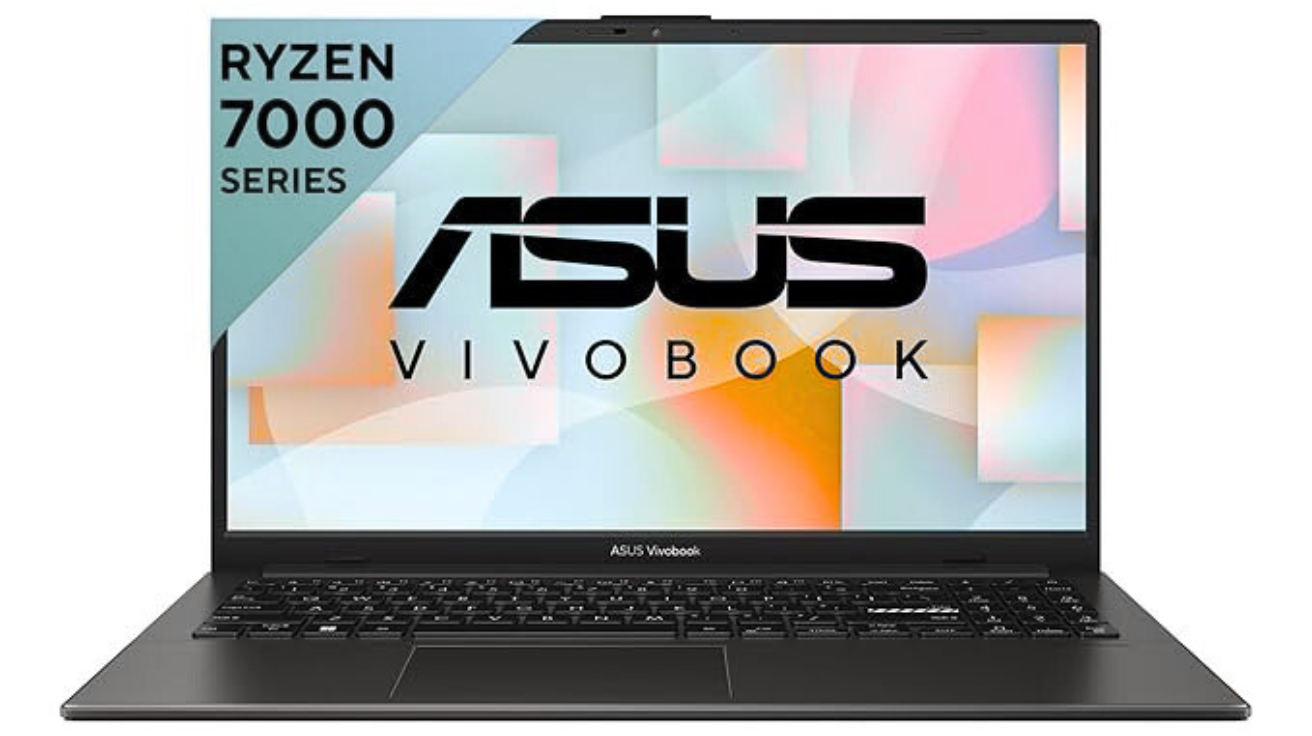
Introduction: A Laptop Made for Everyday Users
Choosing the right laptop has become confusing because the market is flooded with hundreds of models. Each laptop highlights different features like fast processors, bright screens, lightweight bodies, long battery life, and stylish designs. But not everyone needs a very powerful or expensive device. Many people simply want a laptop that is affordable, reliable, lightweight, and smooth for daily use.
This is exactly where ASUS Vivobook Go 15 (Ryzen 3 7320U) becomes a great choice.
ASUS designed this laptop for students, office users, freelancers, and everyday home users who want a simple, comfortable, and easy-to-carry machine. With its lightweight design, long battery life, fast SSD storage, and capable AMD processor, this laptop aims to deliver everything required for daily productivity.
In this long and detailed article, you’ll understand:
- Who this laptop is for
- What performance you can expect
- How good its display, design, and battery are
- Whether it is worth buying in 2025
- Full breakdown of specifications in simple language
- Real-life usage scenarios
- Pros and cons
- Final verdict
Let’s begin exploring the ASUS Vivobook Go 15 (Ryzen 3 7320U) in detail.
Chapter 1: Design & Build Quality – Lightweight Yet Strong
1.1 A Clean and Modern Look
The ASUS Vivobook Go 15 has a simple yet modern design. It uses a “Mixed Black” color that looks elegant and professional. Whether you’re a student taking it to college or a working professional using it in the office, the laptop looks neat and classy.
The surface has a soft matte feel, so it doesn’t easily capture fingerprints. The curves are smooth, and the corners are rounded, making the laptop comfortable to hold.
1.2 Lightweight for Better Portability
The laptop weighs around 1.63 kg, which makes it easy to carry in a backpack or handbag. Many laptops in this price range weigh more than 1.8 or 2 kg, so the Vivobook Go 15 is comparatively lighter.
For daily commuters, school students, travelers, or office employees who move around often, this laptop’s light weight makes a noticeable difference.
1.3 Build Quality
Although the laptop is made of plastic, ASUS has used sturdy materials that feel strong and long-lasting. The hinge opens smoothly, and the display stays stable without shaking unnecessarily.
ASUS laptops are known for good durability, and this model also maintains that standard.
1.4 Keyboard & Typing Experience
The laptop features a full-size keyboard with:
- Comfortable key travel
- Smooth typing experience
- Sturdy keys that don’t wobble
- Quiet typing sound
For students writing assignments, office workers typing documents, or writers preparing long articles, the typing experience is excellent for its price.
1.5 Touchpad Quality
The touchpad is large enough for comfortable use. It supports:
- Multi-touch gestures
- Smooth scrolling
- Tap-to-click
- Good palm rejection
It works accurately and feels responsive during everyday use.
Chapter 2: Display – A Good FHD Screen for Daily Tasks
2.1 Full HD Resolution
The Vivobook Go 15 comes with a 15.6-inch Full HD display (1920×1080).
A Full HD screen is perfect for:
- Watching movies
- Attending online classes
- Typing notes
- Browsing the internet
- Working on spreadsheets
The text appears sharp, images look crisp, and videos play smoothly.
2.2 60Hz Refresh Rate
This laptop has a 60Hz refresh rate, which is ideal for daily tasks. While gaming laptops come with 120Hz or 144Hz refresh rates, a 60Hz screen is perfectly fine for.
- Movies
- Classes
- Zoom calls
- Office work
2.3 Brightness & Color
The brightness level is suitable for indoor use, but outdoor visibility depends on sunlight. Colors appear natural, and viewing angles are decent. It’s not a high-end color-accurate panel, but it’s more than enough for casual users.
2.4 TUV Low Blue Light Certified
ASUS includes eye-care technology that reduces blue light.
This helps when:
- Studying for long hours
- Attending long meetings
- Working at night
Your eyes feel less strained while using the laptop for many hours.
Chapter 3: Performance – Powered by AMD Ryzen 3 7320U
This is the heart of the laptop.
3.1 The AMD Ryzen 3 7320U Processor
The laptop uses AMD Ryzen 3 7320U, which is a 4-core, 8-thread CPU built on AMD’s efficient Zen 2 architecture. It is designed for.
- Smooth multitasking
- Stable performance
- Low heat generation
- Good battery life
3.2 Everyday Performance
This laptop handles everyday tasks very smoothly, such as:
- Browsing with multiple tabs
- Watching YouTube
- Attending online classes
- Working on MS Word, Excel, PowerPoint
- Using social media
- Online shopping
- Reading PDFs
The system feels fast thanks to SSD storage and a lightweight OS experience.
3.3 AMD Radeon Integrated Graphics (iGPU)
The built-in Radeon graphics allow:
- Smooth video playback
- Light photo editing
- Casual gaming at very low settings
You can play older or lighter games like:
- CS:GO
- Valorant
- GTA V (low settings)
- Minecraft
- Roblox
- FIFA
- Asphalt
This is not a gaming laptop, but it still manages basic games without major issues.
3.4 8GB RAM – Enough for Most Users
The laptop includes 8GB LPDDR5 RAM, which is faster than DDR4 memory and improves performance during.
- Multitasking
- Loading apps
- Switching between browser tabs
LPDDR5 also uses less power, helping improve battery life.
3.5 512GB NVMe SSD – Fast Storage
A big advantage of this laptop is the fast 512GB SSD.
With SSD storage, you get:
- Faster boot time
- Faster app loading
- Smooth file transfers
- Less noise
- No risk of mechanical failure like HDDs
512GB is enough for:
- Documents
- Movies
- Photos
- Software
- Projects
- Light games
Chapter 4: Battery Life – All-Day Usage
4.1 Long Battery Backup
The Vivobook Go 15 provides good all-day battery performance.
You can expect:
- 6–8 hours with normal use
- 4–6 hours with heavy usage
- 8+ hours with light tasks like document typing
This makes the laptop great for:
- School
- Office
- Travel
- Online classes
4.2 Fast Charging Support
It supports fast charging, which means:
- The battery charges quickly
- Less waiting time
- More productivity
Charging from 0% to 50% typically takes around 45–50 minutes.
Chapter 5: Software & Features
5.1 Windows 11
The laptop comes with Windows 11, which has:
- Clean interface
- Better multitasking
- Snap layouts
- Widgets
- Improved performance
Windows 11 is optimized for both touch and traditional laptop users, making the experience smooth and modern.
5.2 Microsoft Office Home 2024 + M365 Basic (1 year)
This is a big benefit for students and office workers.
You get:
- Word
- Excel
- PowerPoint
- Outlook
All these tools are essential for productivity.
5.3 MyASUS App
ASUS provides the MyASUS app to:
- Update drivers
- Optimize performance
- Boost battery life
- Monitor system health
- Connect to mobile devices
This app makes managing your laptop easier.
Chapter 6: Connectivity & Ports
6.1 Ports Available
The laptop includes all essential ports:
- USB-A ports
- USB-C port
- HDMI port
- 3.5mm audio jack
- Charging port
You can easily connect:
- Pen drives
- External monitors
- Headphones
- Keyboards
- Mouse
- Projectors
6.2 WiFi & Bluetooth
The laptop supports:
- WiFi 6
- Bluetooth 5.0
These offer:
- Faster wireless speeds
- Better stability
- Low latency
Chapter 7: Audio & Webcam
7.1 Speakers
The stereo speakers offer clear and decent sound. They are good for:
- Watching videos
- Listening to music
- Attending calls
They are not very loud, but clear and good enough for everyday use.
7.2 Webcam Quality
The webcam is 720p.
It works well for:
- Online classes
- Video calls
- Meetings
ASUS includes noise-reduction features to improve quality in low light.
Chapter 8: Who Should Buy ASUS Vivobook Go 15?
Ideal For:
- Students
- Office workers
- Home users
- Online class takers
- Content writers
- Freelancers
- Light editors
- Teachers
- Beginners
Not Ideal For:
- Heavy gamers
- Video editors
- Programmers needing high performance
- 3D designers
It is perfect for daily use, but not for heavy professional work.
Chapter 9: Real-Life Usage Scenarios
9.1 For Students
Students can use it for:
- Assignments
- Online classes
- Research
- Watching educational videos
- Creating presentations
It’s lightweight, so carrying it to college is easy.
9.2 For Office Users
For business tasks, it handles:
- Documents
- Emails
- Meetings
- Presentations
- Data entry
- Accounting
9.3 For Home Use
Perfect for:
- Browsing
- Shopping
- Social media
- Watching movies
- Learning
9.4 For Casual Creators
You can do:
- Light video editing
- Photo editing
- Graphic designing (basic level)
Chapter 10: Pros & Cons
Pros
- Lightweight
- Good build quality
- Fast SSD
- Smooth performance
- Great for students
- Full HD display
- Fast charging
- Windows 11 + Office 2024 included
Cons
- Not for heavy gaming
- Limited upgrade options
- Average webcam
- Basic speakers
Chapter 11: Final Verdict
The ASUS Vivobook Go 15 (Ryzen 3 7320U) is one of the best budget-friendly laptops for everyday users.
It combines:
- Good performance
- Lightweight body
- Attractive design
- Long battery life
- Windows 11
- Office software
- Fast storage
If you want a laptop for studies, office work, online classes, or home use, this is an excellent choice.
It gives smooth performance without lag and offers great value for money.
Conclusion (Final Words)
The ASUS Vivobook Go 15 is a reliable, stylish, and efficient laptop that fulfills the needs of most everyday users. It doesn’t aim to be a high-end gaming or editing machine, but for its price, it offers wonderful features that make daily computing simple and enjoyable. With strong build quality, good battery life, and a capable processor, it stands out as one of the best affordable laptops in its category.
If your needs are simple—studying, browsing, office tasks, attending classes—then the ASUS Vivobook Go 15 (Ryzen 3 7320U) is an excellent, long-lasting, value-for-money option.